Regarding version numbers, the Beta version number for 26H1 is Build 28020.2818; the Experimental version number for 26H1 is Build 28120.2824.
 By Sam Ovie
·
Published on August 31, 2026
·
3 min read
By Sam Ovie
·
Published on August 31, 2026
·
3 min read
Microsoft posted a blog post today (August 31) inviting members of the Windows Insider program on the Beta channel to test the latest preview update for Windows 11.
Regarding version numbers, the Beta version number for 26H1 is Build 28020.2818; the Experimental version number for 26H1 is Build 28120.2824.
In terms of update content, the biggest highlight of this update is the addition of networking capabilities to the Windows Recovery Environment (WinRE). In existing Windows 11 systems, WinRE can only automatically connect to wired Ethernet or pre-configured Wi-Fi networks; users must manually enter the password for WPA2/3 networks.
The new version allows WinRE to directly access Wi-Fi credentials already saved in the main system, including those for networks that support certificate authentication. This primarily serves scenarios such as “rapid fault recovery” and “cloud-based system reinstallation,” aiming to reduce manual configuration steps for users. This feature is enabled by default, but enterprise IT administrators can choose to disable it based on their security policies.
Daily Lamp has attached the following update details:
1. Personalized settings
- Improve the stability of the “Settings > Personalization > Background” page.
- Added support for using DIB image files as desktop wallpaper
- Improve the reliability of desktop slideshow wallpaper switching for newly created accounts
- Optimize the resolution of the preview images in the wallpaper selection interface of “Settings > Personalization > Background”.
- Improve the display effect of desktop wallpaper preview in portrait mode.
- Optimizes stability when switching desktop wallpapers in a short period of time.
- Multiple desktop environments support slideshow wallpapers and will not be forcibly reset to single-image mode.
- Fixed the issue where the wallpaper turned black on some devices after restarting in the previous preview version.
2. Print Management
- The newly designed, modern print management interface has been temporarily removed from the preview version. Microsoft will continue to refine the feature based on user feedback. Traditional print management tools will be retained and will not be affected by the changes.
- After further iterations and improvements, the modernized print management interface will be pushed back to preview users.
3. File Explorer
File Explorer’s homepage remembers the expanded/collapsed state of each group, and reopening it will retain the last browsing state.
4. Magnifier
- Modernize the UI of the magnifying glass toolbar:
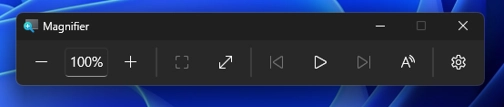
- The toolbar icons have been updated to match the Windows 11 visual language, resulting in a cleaner and more modern interface.
- Adjust the inner margins and spacing of the toolbar for a more organized and consistent layout.
5. Emoji expressions
Supports Emoji 17.0 standard, with new expressions such as distorted face, conflict cloud, and furry creature; press Win + . to bring up the emoji panel to use them.

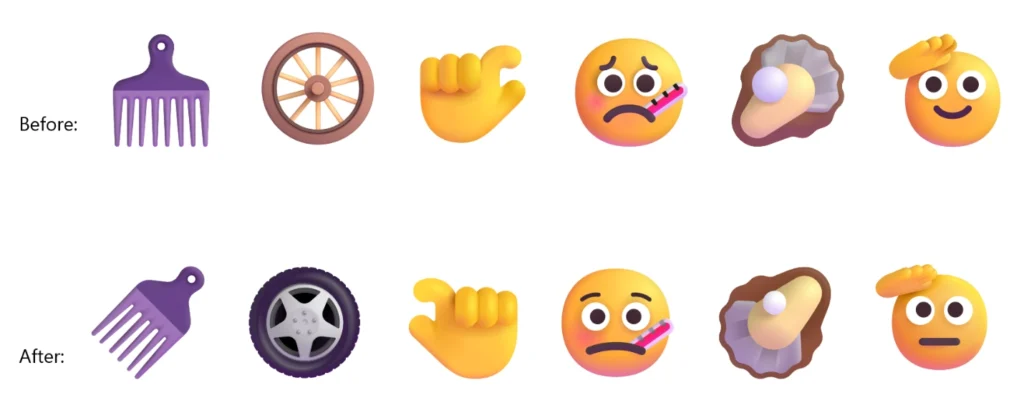
We have also adjusted the drawing styles of some existing emoticons to improve cross-platform visual consistency, including emoticons such as saluting face, peeping face, goose, lotus flower, and kissing cat.